

Introduction
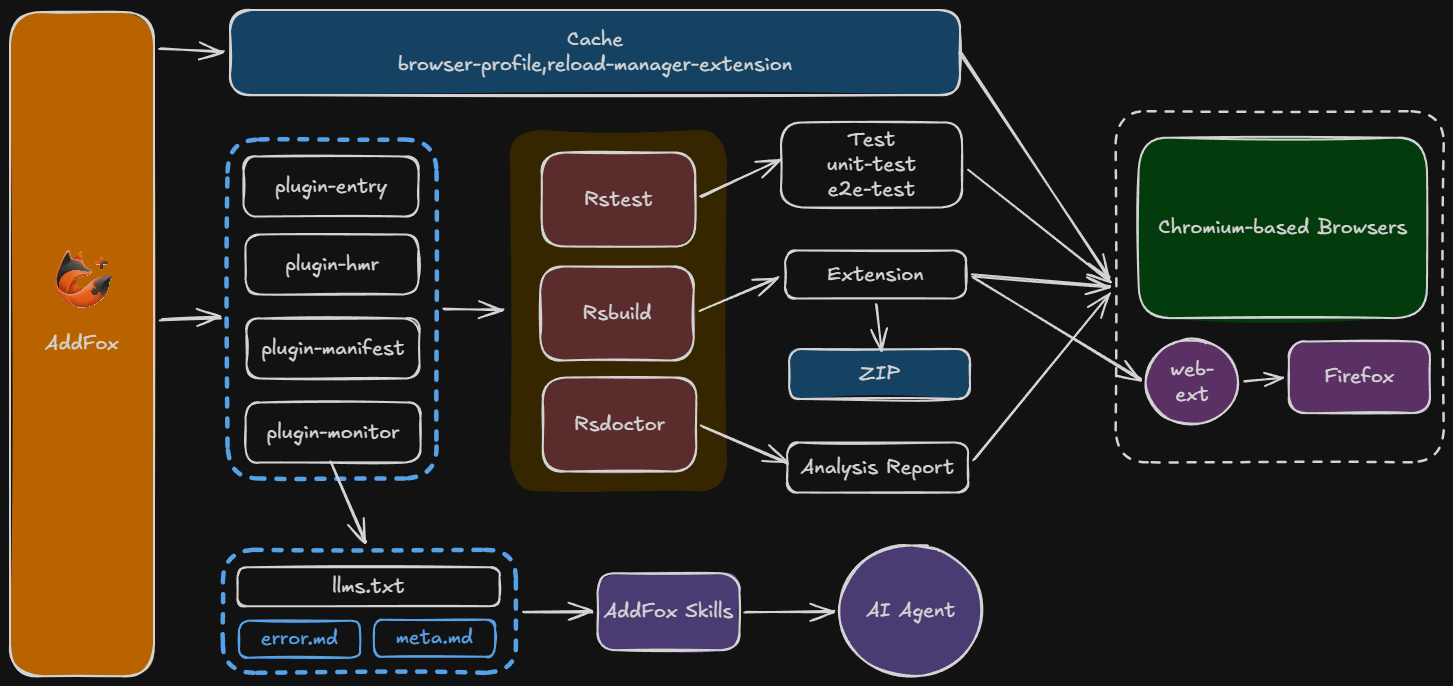
Addfox is a browser extension development framework built on Rsbuild, helping you develop and build Chrome and Firefox extensions in a single project.
Why Addfox
Developing browser extensions should be simple—just HTML, JavaScript, and CSS. But in reality, issues like hot reload, error debugging, and frontend framework integration have plagued developers.
Addfox's goal is to make extension development simple again:
In the AI era, Addfox goes further to help AI better understand and assist with your extension development:
- AI-friendly project structure — Automatically generates structured documents like
llms.txtandmeta.md, enabling AI assistants to quickly understand project architecture and configuration - Terminal error output — Errors are output directly to the terminal during development, no need to open browser DevTools, making it easy to use Ask AI features in any editor
- Skills support — Built-in reusable AI skill library (e.g., migrate-to-addfox, addfox-debugging) enables AI assistants to assist development and debugging more professionally
- Minimal code constraints — No enforced code organization patterns, allowing AI-generated code to integrate seamlessly into your project
Whether you're a developer or using AI-assisted development, Addfox provides a better experience.
Features
For Developers
Hot reload, multi-browser support, and minimal config so you can ship extensions faster.
For AI
Structured meta, terminal errors, and skills—so agents can understand and extend your extension.
Core Concepts
Addfox encapsulates common pain points in extension development:
- Entry auto-discovery — Place files by convention, no need to manually configure entry
- Smart manifest handling — Auto-inject built paths
- Dev auto-reload — WebSocket listens for build completion, auto-refreshes extension
Compared to Other Solutions
The extension development ecosystem has been greatly enriched by excellent frameworks. WXT brings the power of Vite with a well-designed plugin system and intuitive conventions. Plasmo offers comprehensive cloud integration and a polished, batteries-included developer experience. Extension.js provides remarkable simplicity for quick prototypes. Each has made significant contributions to making extension development more accessible.
Addfox stands on the shoulders of these giants while carving its own path:
Addfox's unique advantages:
- Rsbuild-powered speed — Faster cold starts and HMR compared to Vite/Parcel-based solutions
- AI-first design — Built-in
llms.txt, structured error output, and Skills support for AI-assisted development - Maximum freedom — No enforced file structures or custom APIs; use your preferred patterns
- Framework-agnostic core — Works with any UI framework without wrapper components or special adapters
Quick Start
Edit app/popup/index.tsx, and the extension will auto-reload on save.
Next Steps
- Installation — Detailed project creation steps
- App Directory — Learn about project organization
- Config Reference — View all configuration options